

How to use a discount code when purchasing GSC Vault
Enter your email and full name on the Creem checkout page, apply the discount code before payment, and confirm that the total has changed.
Strategy Brief
- Use an email address that can receive your receipt and License Key
- Enter the code in the Discount code field before continuing to payment
- Check the updated total before you pay
If you received a GSC Vault discount code, apply it on the Creem checkout page before completing your payment. A valid code is applied to the eligible product automatically.
Start from the official GSC Vault pricing page and choose the plan you want to purchase. The exact price, tax, and billing fields shown at checkout may vary by product and location.
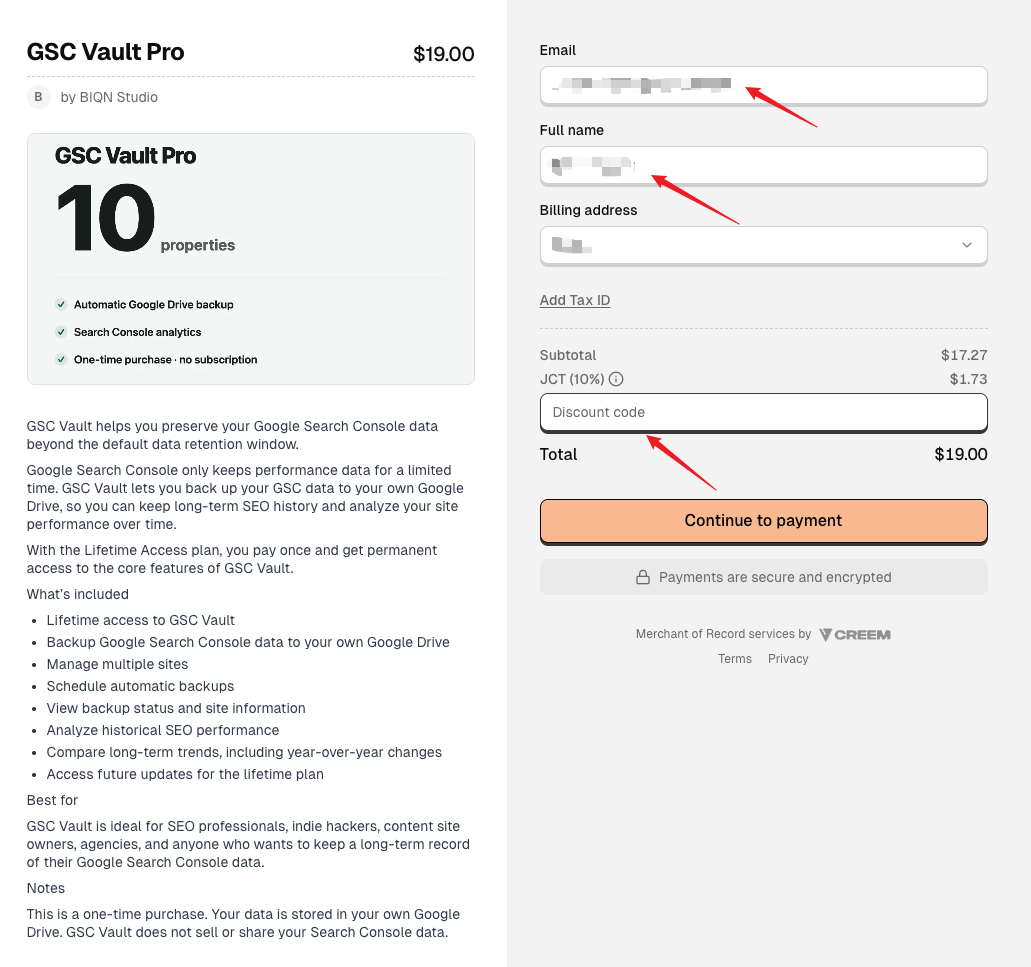
Step 1: Enter your email
Enter an email address you can access. Creem uses this address for the payment confirmation and receipt, and your GSC Vault License Key is also provided after a successful purchase.
Check the address carefully before continuing. A typo can prevent you from receiving the purchase email.
Step 2: Enter your full name
Enter your name in the Full name field. Complete the billing address or tax information shown by Creem if it is required for your location.
Step 3: Apply the discount code
Find the Discount code area below the order subtotal. Some checkout versions may first show a Use discount option; select it to reveal the input field.
Enter the code exactly as it was provided. Avoid adding spaces before or after it. If the code is valid for the selected product and has not expired, Creem applies it automatically.
Before selecting Continue to payment, confirm that the discount appears in the order summary and that the total has changed. Do not complete the payment if the expected discount is not shown.
If the discount code does not work
Check the following:
- The code was copied completely, without extra spaces.
- The code is valid for the GSC Vault plan you selected.
- The code has not expired or reached its redemption limit.
- The discount is visible in the order summary before payment.
Creem supports customer-entered discount codes at checkout and applies codes that are valid for the product and still active. You can read the Creem discount code documentation for the platform's general rules.
If the code still does not work, do not submit the full-price payment expecting the discount to be added later. Contact us first so we can check the offer.
If you have a payment problem
Email support@wossoft.cn and include:
- The email address entered at checkout.
- The GSC Vault plan you were trying to purchase.
- The approximate time of the payment attempt.
- The discount code or offer you received.
- A screenshot of the error, with payment details hidden.
Never send your full card number, security code, bank password, or complete GSC Vault License Key by email.
If the payment succeeded but you cannot find your License Key, check the Creem confirmation page, your email inbox and spam folder, and the Creem Customer Portal before contacting us.
Turn this strategy into a data asset.
Stop losing Search Console history today. Install GSC Vault and start building your own permanent archive.
No subscription required • User-owned Google Drive