

Will the extension click Request Indexing for me?
No. The extension opens the correct Property, prepares the URL, and tracks progress. You complete Google's Live Test and final Request Indexing action yourself.
Built into the Chrome extension
The Indexing Assistant reads Sitemaps submitted in Search Console, checks Google's known indexed version, separates eligible, requested, indexed, and non-indexable URLs, and keeps an operational record of every action.
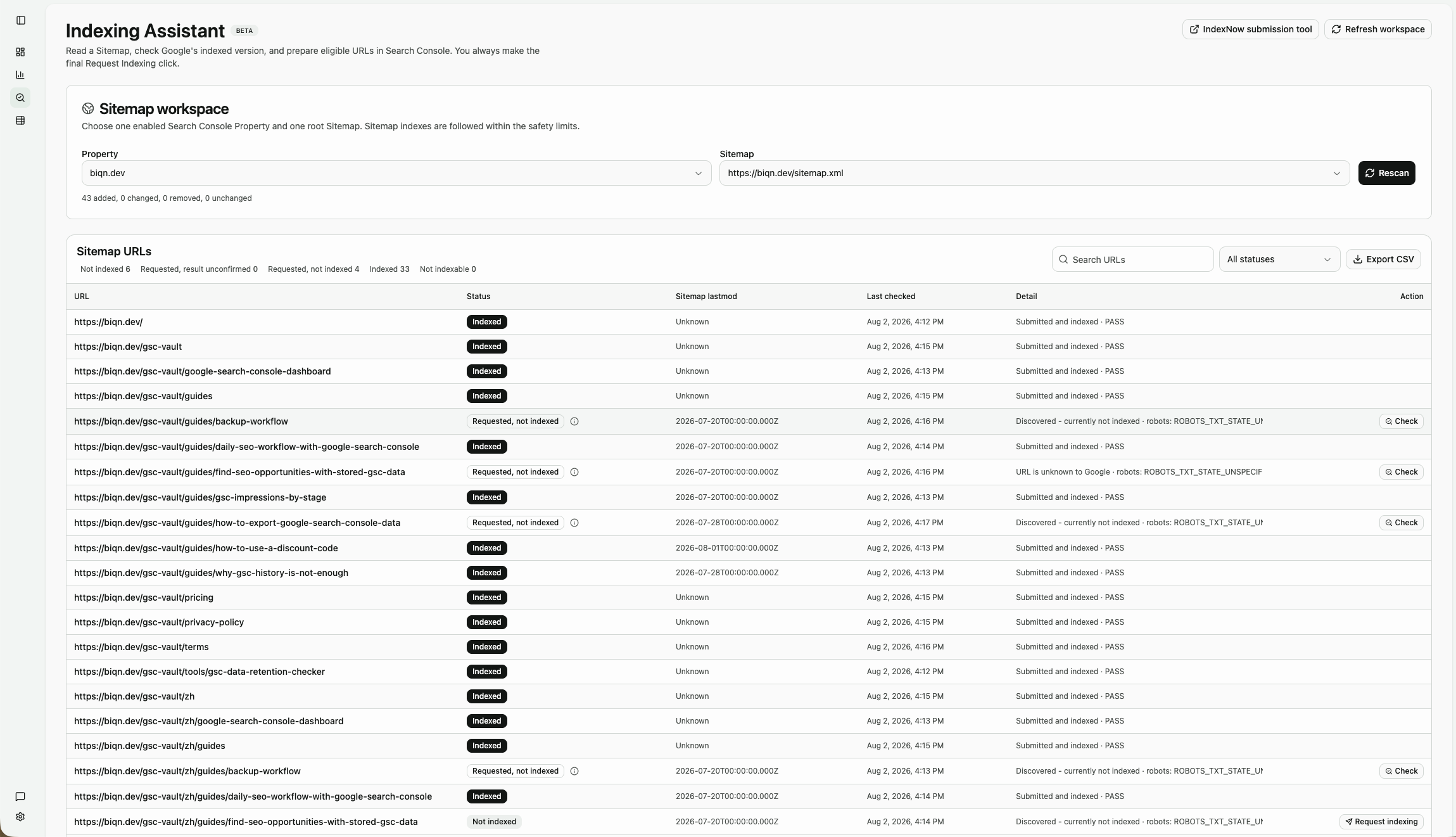
See every Sitemap URL's working state in one place
Filter unindexed, requested, indexed, and non-indexable URLs, then review the inspection detail and next action for each row.
Search Console can explain one URL at a time. Once you publish regularly, the time-consuming work is finding the right URLs, understanding each result, making requests, and remembering what happened.
The assistant keeps the last successful snapshot and identifies added, lastmod-changed, and removed URLs on the next scan, reducing repeated checks.
It organizes crawl, robots, noindex, and canonical information returned by Google, separating URLs that can continue from URLs that are currently not indexable.
Opening Search Console, confirming the request, and checking the eventual result are distinct actions. The workspace records each one instead of calling every request indexed.
The assistant can organize index checks, while Google's final Request Indexing action remains under your control in Search Console.
Step 1
Start from a Sitemap already submitted in Search Console or enter one manually. Nested Sitemap indexes are followed within explicit safety limits.
Step 2
The workspace shows scan progress and prioritizes new, changed, expired, failed, and post-request URLs that need another check.
Step 3
Eligible unindexed URLs get a Request Indexing action. Redirects, noindex pages, fetch failures, and canonical conflicts keep a specific explanation instead.
Step 4
Back in the workspace, confirm that you requested indexing, then use Check later to read Google's current index state until the page is indexed or needs more work.
Continue in the correct Search Console Property
The extension carries the target URL into Search Console. You still run the Live Test and make the final Request Indexing click.
The assistant condenses Google's detailed results into five working states while preserving technical reasons in the detail column.
Return to the assistant and confirm the request to move the URL into Requested, not indexed. You can check it again later without trying to remember which URLs in a long list were already handled.
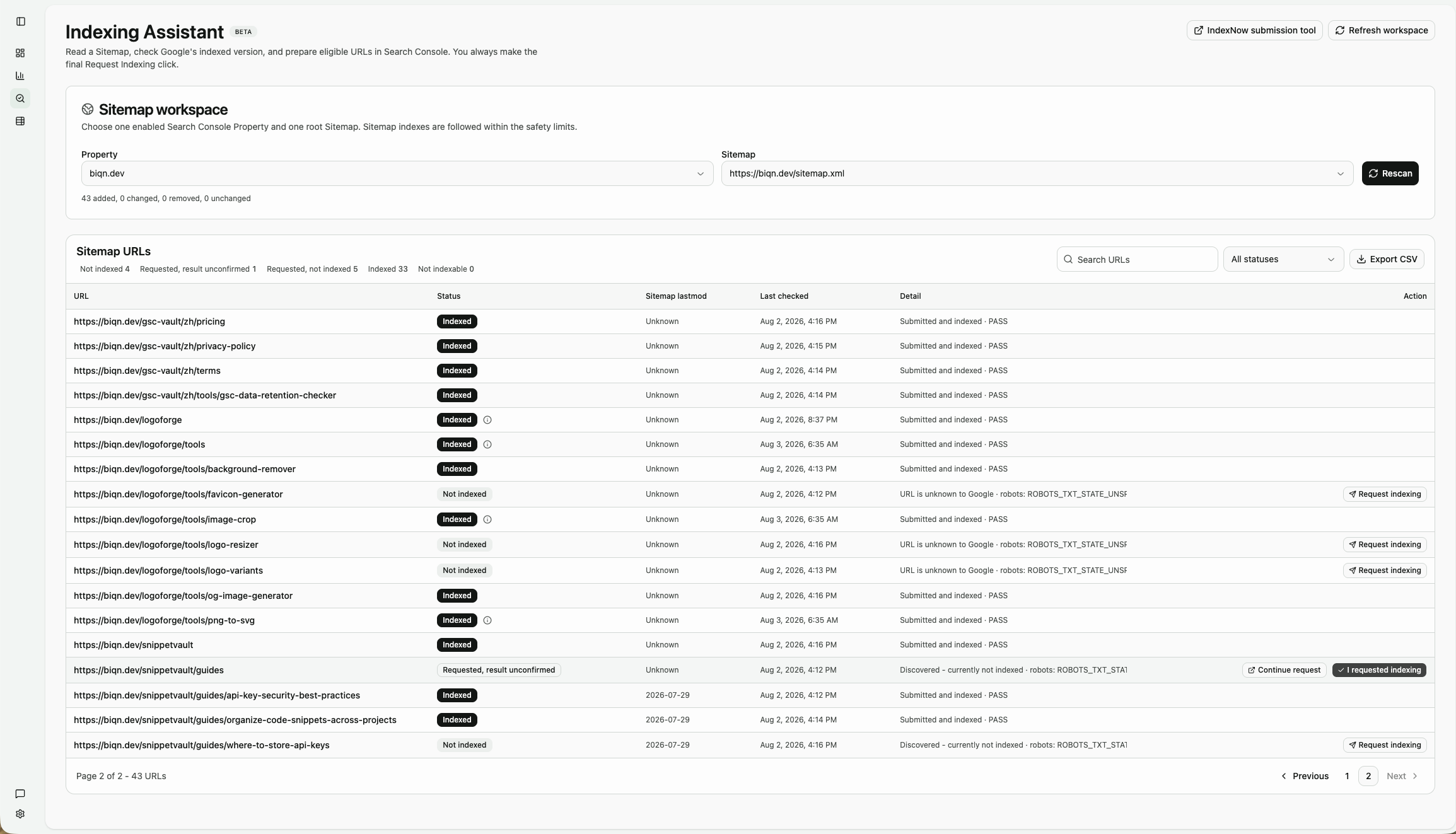
A request record stays separate from the index result
The workspace records opening the request, user confirmation, and later inspections separately so a long URL list remains manageable.
This workflow removes repetitive work without changing Google's supported process for ordinary web pages.
Index inspection uses read-only Search Console access. Sitemap URLs, inspection results, request records, and follow-up states are stored in the extension's local IndexedDB.
This indexing workspace data is not written to Google Drive or sent to a GSC Vault backend. OAuth tokens, raw authorization responses, and complete page HTML are not logged.
Google and IndexNow are separate workflows. Use the Search Console Indexing Assistant for Google, and the free IndexNow Sitemap Submitter for Bing and other participating services.
No. The extension opens the correct Property, prepares the URL, and tracks progress. You complete Google's Live Test and final Request Indexing action yourself.
No. It can organize and inspect multiple Sitemap URLs, but requests for ordinary pages are completed one URL at a time in Search Console.
No. A request asks Google to reconsider crawling. Crawling and indexing may take days or weeks, and a page may still be excluded for quality or technical reasons.
Google limits the Indexing API to two use cases: job posting pages (using JobPosting structured data), and livestream pages (using BroadcastEvent inside a VideoObject). It is not available for ordinary articles, product pages, or tools.
No. Sitemap URLs, inspection results, request history, and follow-up state stay in local browser storage by default.
Install GSC Vault, choose a Property and Sitemap in the Indexing Assistant, find the URLs that need attention, and keep each request and follow-up result organized.
Install the Indexing Assistant